Just came by this, an article I wrote for Cisco (Internet Protocol Journal) back in 2004.
SE Linux and BIND9
DSA 1617-1 a security update from Debian says they forgot to update the SE Linux policy that would allow BIND9 to randomize its source ports…
I always found SE Linux to be too complex for my needs, but now it turns out you can actually be more vulnerable when you run SE Linux.
I know enough.
Fool the Dutch nameserver check
.nl employs a system for registering a domain name that works as follows:
- you setup a zone
- you register the zone name
- .nl checks the zone from your nameservers
- if the zone is found to be OK, your name is registered
- if it is not ok, you have to fix your zone or the name is already claimed (you can check that before hand)
This conflicts with how most ISPs work. Where one just updates the provisioning database and it (ideally) goes right to the registry to claim the name. Then after some time you “dump” the provisioning database on the network and automatically configure the zone for the customer.
Not thin, not thick, but lazy
I’m trying to move my noisy server to the cellar I’m left with the question how do I cater for my desktop computer needs. I would be nice to have a thin client, but then you have the problem that local devices do not work: because you are actually working on the server, it needs to “know” somehow that you have locally inserted an USB disk. This sucks.
So how about a thick client, a client with enough power to run a full blown Linux distro. This works but has the following disadvantages:
teletext (NL) script
Small script which display “teletekst” pages from the Dutch teletext (or the Belgium, but I’ve never used that).
I’m not the original author, but feel free to grab your copy.
#!/usr/bin/perl
#
# Dit scriptje laat de NOS teletext zien
#
# (c) 2001, 2002, 2003 by Bas Zoetekouw <bas@debian.org>
# All rights reserved.
#
# Naar een idee van Wouter Bergmann-Tiest
#
# Redistribution and use in source and binary forms, with or without
# modification, are permitted provided that the following conditions
# are met:
# 1. Redistributions of source code must retain the above copyright
# notice and this list of conditions.
# 2. Redistributions in binary form must reproduce the above copyright
# notice and this list of conditions in the
# documentation and/or other materials provided with the distribution.
#
#
## 2003-01-06: niew teletekst format
## 2003-01-06: kleurtjes
## 2003-01-06: meer html entities toegevoegd (dank Richard)
## 2003-01-22: VRT support
## 2003-02-07: kleur support aangepast
#use strict;
#my $SOURCE = "VRT";
my $SOURCE = "NOS";
my $LYNX;
foreach my $l (qw|/usr/bin/links /usr/bin/lynx lynx|) {
if (-x $l) {
$LYNX=$l; last;
}
}
my $color = 1;
if ((scalar @ARGV > 0) && ($ARGV[0] eq "-m")) {
$color = 0;
shift @ARGV;
}
my %COLORS = ( "000000" => "\e[30m", #black
"black" => "\e[30m", #black
"ff0000" => "\e[31m", #red
"red" => "\e[31m", #red
"00ff00" => "\e[32m", #green
"lime" => "\e[32m", #green
"0000ff" => "\e[34m", #blue
"blue" => "\e[34m", #blue
"ffff00" => "\e[33m", #yellow
"yellow" => "\e[33m", #yellow
"ff00ff" => "\e[35m", #magenta
"fuchsia"=> "\e[35m", #magenta
"00ffff" => "\e[36m", #cyan
"aqua" => "\e[36m", #cyan
"ffffff" => "\e[37m", #white
"white" => "\e[37m", #white
"reset" => "\e[0m"); #reset color
my %HTML = ( """ => '"',
"­" => "",
"<" => '<',
"&" => '&',
">" => '>');
sub display(\@) {
my @Output=@{(shift)};
my ($print, $last) = (0, 0);
foreach my $line (@Output) {
# print "--> $line";
($print = 1) if ($line =~ s/^.*<pre>//i);
($last = 1) if ($line =~ s/<\/pre>.*$//i);
next unless ($print==1);
if ($color==1) {
foreach (keys %COLORS) {
$line =~ s/COLOR=$_[^>]*>/>$COLORS{"$_"}/ig;
}
}
foreach (keys %HTML) {
$line =~ s/$_/$HTML{"$_"}/ig;
}
$line =~ s,<[^>]+>,,g;
last if ($last == 1);
print $line;
}
print $COLORS{"reset"};
}
my ($Pagina, $SubPagina) = @ARGV;
$Pagina = "100" if (scalar @ARGV == 0);
$SubPagina = "1" if (scalar @ARGV <= 1);
my @Output = ("");
if ($SOURCE eq "NOS") {
$SubPagina = sprintf("%02i", $SubPagina);
@Output = `$LYNX -source 'http://teletekst.nos.nl/tekst/${Pagina}-${SubPagina}.html'`;
} elsif ($SOURCE eq "VRT") {
@Output = `$LYNX -source 'http://193.121.55.225/tt/tt.php?p=${Pagina}/${SubPagina}&g=0&s=0&r=0&x=1'`
}
display @Output;
multihome setup in Linux
This is an older article that I’ve brought back to live This was original written at the time of Linux 2.6.0
So be ware!
update
As it turns out, the script below never did work correctly (see the bottom of
this page for an updated version). The reason it did work for me was that sshn
INET_2 never blocked outgoing port 25…until October the 8th. This was at the
same time I was experimenting with linux2.6 (go figure). When sshn started to
block port 25 outgoing, the script broke. For telnet session to port 25 it
worked correctly, but actual sending of email was already done from a high port.
This was always (incorrectly) routed through INET_2.
Vim and GPG
This info can also be found on the Internet, but I thought I compile it here too.
Problem
You want to save something (say passwords) in a file and protect the file with a master password (say with your PGP/GPG key). This can be cumbersome unless you have vim.
The following examples will handle *.gpg files differently, vim will
decrypt the file when opening it and encrypt the file when writing it.
Also the use of a swap file is disabled.
f()
You all, of course, know about the fc command. From bash’s help system:
fc: fc [-e ename] [-nlr] [first] [last] or fc -s [pat=rep] [cmd]
fc is used to list or edit and re-execute commands from the history list. FIRST and LAST can be numbers specifying the range, or FIRST can be a string, which means the most recent command beginning with that string.
Now I had the following problem: you have a file with shell commands in it. Next you want to select a few lines from this file to be executed in your running shell. A way to do this is:
XFCE to Xmonad and back again
Well, after giving Xmonad a chance I’ve reverted back to XFCE. This time with a 1-pixel wide window decoration. Short story: I really like the tiling of Xmonad (or any other tiling window manager). But you do miss some flexibility if you really want to move a window. Also I needed a panel and system tray, which are available as third-party tools, but aren’t the real deal.
So back to XFCE.
zsh prompt, part 2
Every now and then I get the ‘prompt-itch’ and then I need to tweak my prompt again :) Of course I’m very happy with the way my prompt was.
My idea of a good prompt is to be as short as possible and still be informative about your environment:
Only tell stuff I’m really interrested in and for the rest SHUT THE HELL UP!
So no date output in my prompt, If I want to know the time I will type
date myself. I’m still thinking about leaving out the current hostname
and current username… but for some reason I’ve become attached to
seeing elektron (my hostname) on the screen.
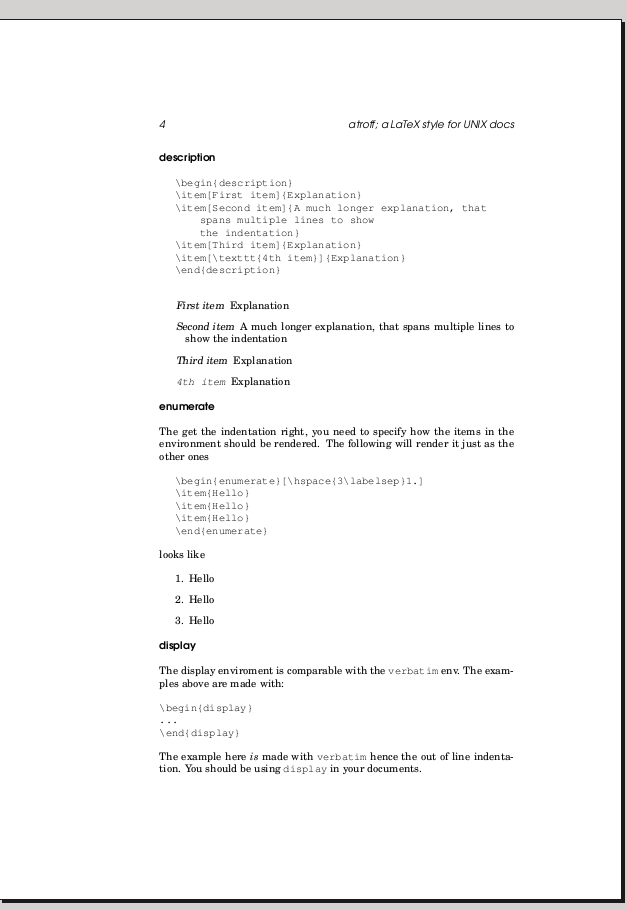
a new LaTeX style
I’ve created a new latex style to mimic some old school UNIX manuals I’ve been reading the past few months. It’s a very plain style that keeps out of your face. This in contrast with the blockbook style
This is how it looks:
You can read about it a small howto doc. To use it, you will also need the class file.
UPDATE
I’ve updated the style file so that the description lists will be
indented with the same amount of space, no so more
XFS corrupt again
Hmmm, this is the second time in 1 year that I had a corrupt filesystem
on my raid partition. I saw no other option than mke2fs -j /dev/md7.
My first problem with XFS started on my fileserver, which only had 256
MB of memory. Turns out XFS was OOM-ing inside the kernel, this in
turned messed up the filesystem. xfs_repair was also running out of
memory. When I finally got enough virtual memory in this box
xfs_repair was kind enough to segfault. Ok, shit happens, mkfs.xfs
and try again.
Giving GNOME the boot
The GNOME decadence thread got me thinking. What does GNOME give me? (I consider myself a hardcore UNIX user). Well… it gives a nice interface with a nice terminal implementation (gnome-terminal). Further more with the recent Ubuntu 8.04, it also provides
- PulseAudio, never got that working btw, went back to ALSA.
- Tracker, what the hell was ever wrong with
locate? Never got that working, and when I did, it was dog slow. - I should be using evolution for emailing… no thanks! I’m a happy
muttuser. - There is no support for VI-key bindings in GTK… (which is not gnome’s fault, but irritating none the less)
So I purged GNOME from my system and started using Xmonad, a tiling window manager. I’m still using GTK applications, because most of them still rule. But I’m happy that I’m leaving this whole GNOME business behind.
git quick ref
I’m publishing this for my own future reference. A short usage
guide on git for an ex-svn addict.
| goal | client | server |
|---|---|---|
| init .git repo | git init | git init |
| start remote repo | git clone ssh://server | |
| add a file | git add $file | git add $file |
| commit the file | git commit -a -m"log" | git commit -a -m"log" |
| upload to server | git push origin master | |
| import remote changes | git reset --hard |
|
| get changes from server | git pull |
A popup from .procmailrc
Note: this is an older article that I’ve revived. Also note: in todays email flood I don’t know if such a popup is something you want to use…
#intro
I’ve used gnubiff, xbiff and God knows what to
provide a simple notify when receiving mail. But I wanted more.
I want to be able to tweak certain settings, without going in to
the source code of the application. Also the way mail notifiers
mess with your mailbox is not something I particularly like.
DNSSEC Presentation for the NLLGG
On Jun the 7th I gave a little presentation about DNSSEC at the NLLGG meeting. The presentation is in Dutch and the title is: “DNSSEC, wat is het? Komt het er ooit nog van?”
(DNSSEC, what is it? Does it ever happen?)
my git workflow
I’ve been using git for some time now, but as mentioned elsewhere
the learning curse for this ‘stupid content tracker’ is quite steep.
Right now I finally seem be getting the hang of it and can use it in
a svn like manner.
So we have:
- adding a file to a reposity:
git add <file> - committing it to the local branch:
git commit -a -m"log" - uploading it to the remote master:
git push origin master
And the one that took about 2 months to find:
check if a directory is empty in bash
I had this small problem, how to you check if a directory is empty in the shell? Suppose I want to do
cmd po/*
this fails, if the po directory is empty, which in turn makes my
compile barf, but that is another story. I needed something to would
check the emptiness of the directory, and if it is not empty perform the
command, otherwise it skip it.
The trick here is to remember that if a shell wildcard can not be
expanded it will be left alone. So an unexpanded * will stay a *.
Ubuntu 8.04 (beta)
Hmmpf, those Ubuntu guys are good. If just finished a painless upgrade to the new Ubuntu: Hardy Heron.
Some subtile differences; better Gnome (new metacity with composer). And some other stuff that I’m discovering right now. :-)
Setup VIM7 spelling in Ubuntu
The default VIM7 install is equipped with the English dictionary, but as I’m Dutch I wanted to use the Dutch spelling, unfortunately these spell files are not included in Ubuntu. The following article is a short howto on how to add this wonderful feature to your VIM.
Dutch spelling
Download your language from the debian experimental archive.
I needed Dutch so I downloaded:
/main/v/vim-spellfiles/vim-spellfiles-nl_20060604-1_all.deb
Install this with:
dpkg -i vim-spellfiles-nl_20060604-1_all.deb
This will put some files in /usr/share/vim/addons. By default VIM will
not look in that directory. To fix this I’m creating some symlinks from
my local .vim directory:
Best VIM tip ever!
Vim tip 21 allows you to copy text between VIM session running in
different terminals! No more using your mouse to copy, just yank in
one terminal and paste in another!
Put this in your .vimrc:
set clipboard=unnamed
set go+=a
OpenSSH and clear text passwords
Usually people use SSH as a replacement for rsh, which is of course a good thing. SSH uses encryption to transport your password to the remote server for authentication.
But SSH can do more, you can use a public/private key pair and set it up in such a way (google around for howto’s), that SSH will only transport a public key over the Internet. This way no passwords are transported, so even if someone breaks the encryption, no harm is done. Well… at least your private key is still safe (for now).
Boot from USB with RAID on your harddisks
Goal
The name of the game is getting a minimum maintenance RAID server up and running. The OS should be bootable from an USB stick and the RAID disks will be SATA disks.
Installation and setup
This section handles the initial installation and setup procedure. By keeping the OS small (and on USB) it will (hopefully) make backups and restores more easy,
USB stick
First install Debian/Ubuntu on the USB stick. I created two partitions
on the 512 MB sized stick:
/boot and /.
Metacity 2.23.3
I’ve been running a development release of metacity for some time know and I really like it. Especially with the new composer that you can enable.
I’ve made some screenshots of my setup:
drop shadows
Every menu and window has a drop shadow now, this shows the workspace switcher. Too bad this hasn’t got a fixup (yet?).
alt-tabbing The new alt-tab screen. This looks quite a bit like the one from Compiz, but its very nice to have this in metacity itself.
Postfix setup on a laptop.
older article that I’ve revived.
Problem
The problem: you have a laptop and you’re not always connected to the Internet. Still you want to sent mail even when you’re offline. You cannot use just any mail server out there, ‘cause a lot of them don’t relay. So you must use your own mail server.
You'll need:
- postfix, only used for queuing and forwarding the mail
- openSSH, for setting up a tunnel
OpenSSH config You will need to create a ssh tunnel to your mail server. This is the command I use:
DNS filesystem
I’ve reworked my older DNS filesystem Perl script to make something nicer. It’s still not perfect, but works much better.
You can now cat files for instance. The filesizes are something that
should also be fixed, if set them to 512 bytes.
From a DNS standpoint some other things can be improved. Right now everything is shown from a zone (everything that can be discovered that is), however this also includes glue…