# VIM setup
After several years I decided to use a different color scheme for VIM.
Also I'm going for force myself to use VIM's folding abilities and use
`make` from within VIM.
For good measure I also want to use Omni-completion when writing Go
code:
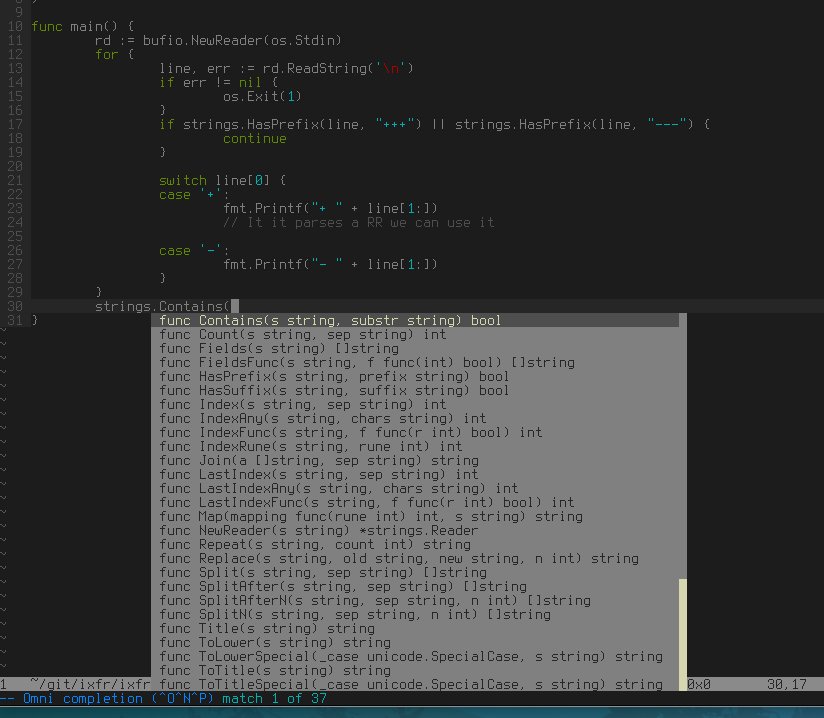 Btw, this screenshots also shows the `solarized` (dark) colorscheme.
# Coloring
Google for `solarized`. In my `.vimrc`:
let g:solarized_termcolors=256
colorscheme solarized
# Make from VIM
Use `:make` inside the editor and jump through the errors with:
:cn // next compile error
:cp // previous compile error
There are more options, but I want to be able to remember them...
# Folding
Settings in `.vimrc`:
" folding settings
set foldmethod=indent
set foldnestmax=10
set nofoldenable
set foldlevel=0
And the commands that I will probably use most often:
zM // close all folds
zR // open all folds
za // toggle fold under cursor
zA // toggle fold under cursor recursively
Other important ones:
zo // open fold under cursor
zO // open all under cursor recursively
zc // close fold under cursor
zC // close all under cursor recursively
# Spell checking
Setting in `.vimrc`:
" toggle spelling control-E -> en, control-N -> dutch (nederlands)
map :setlocal spell! spelllang=en
imap :setlocal spell! spelllang=eni
map :setlocal spell! spelllang=nl
imap :setlocal spell! spelllang=nli
Commands to use (this is the only one I use)
z= // Show corrections for a word
# Toggle switches
Switches for paste-mode, cursorline, numbering disable search highlighting.
set pastetoggle=
" search hilight
map :nohlsearch
imap :nohlsearcha
vmap :nohlsearchgv
" numbering
map :set nu!
imap :set nu!i
vmap :set nu!gv
" toggle cursorline
map :set cursorline!
imap :set cursorline!
# Omni completion (Go specific)
See [https://github.com/nsf/gocode](https://github.com/nsf/gocode). After
you've installed that, you can use `control-X control-O` to bring up
the omni completion window. With the VIM files in `go/misc/vim` you also
have the following commands:
:Fmt // Gofmt your code
:Import strings // add package 'strings' to the import list
:Drop strings // drop package 'strings' from the import list
Btw, this screenshots also shows the `solarized` (dark) colorscheme.
# Coloring
Google for `solarized`. In my `.vimrc`:
let g:solarized_termcolors=256
colorscheme solarized
# Make from VIM
Use `:make` inside the editor and jump through the errors with:
:cn // next compile error
:cp // previous compile error
There are more options, but I want to be able to remember them...
# Folding
Settings in `.vimrc`:
" folding settings
set foldmethod=indent
set foldnestmax=10
set nofoldenable
set foldlevel=0
And the commands that I will probably use most often:
zM // close all folds
zR // open all folds
za // toggle fold under cursor
zA // toggle fold under cursor recursively
Other important ones:
zo // open fold under cursor
zO // open all under cursor recursively
zc // close fold under cursor
zC // close all under cursor recursively
# Spell checking
Setting in `.vimrc`:
" toggle spelling control-E -> en, control-N -> dutch (nederlands)
map :setlocal spell! spelllang=en
imap :setlocal spell! spelllang=eni
map :setlocal spell! spelllang=nl
imap :setlocal spell! spelllang=nli
Commands to use (this is the only one I use)
z= // Show corrections for a word
# Toggle switches
Switches for paste-mode, cursorline, numbering disable search highlighting.
set pastetoggle=
" search hilight
map :nohlsearch
imap :nohlsearcha
vmap :nohlsearchgv
" numbering
map :set nu!
imap :set nu!i
vmap :set nu!gv
" toggle cursorline
map :set cursorline!
imap :set cursorline!
# Omni completion (Go specific)
See [https://github.com/nsf/gocode](https://github.com/nsf/gocode). After
you've installed that, you can use `control-X control-O` to bring up
the omni completion window. With the VIM files in `go/misc/vim` you also
have the following commands:
:Fmt // Gofmt your code
:Import strings // add package 'strings' to the import list
:Drop strings // drop package 'strings' from the import list